

Migrations to the Microsoft platform





Microsoft specializations in Azure Infrastructure and Database Migrations, Azure Virtual Desktop, and Modernizing Endpoints Microsoft Fabric Featured Partner · Databricks Partner
What we migrate
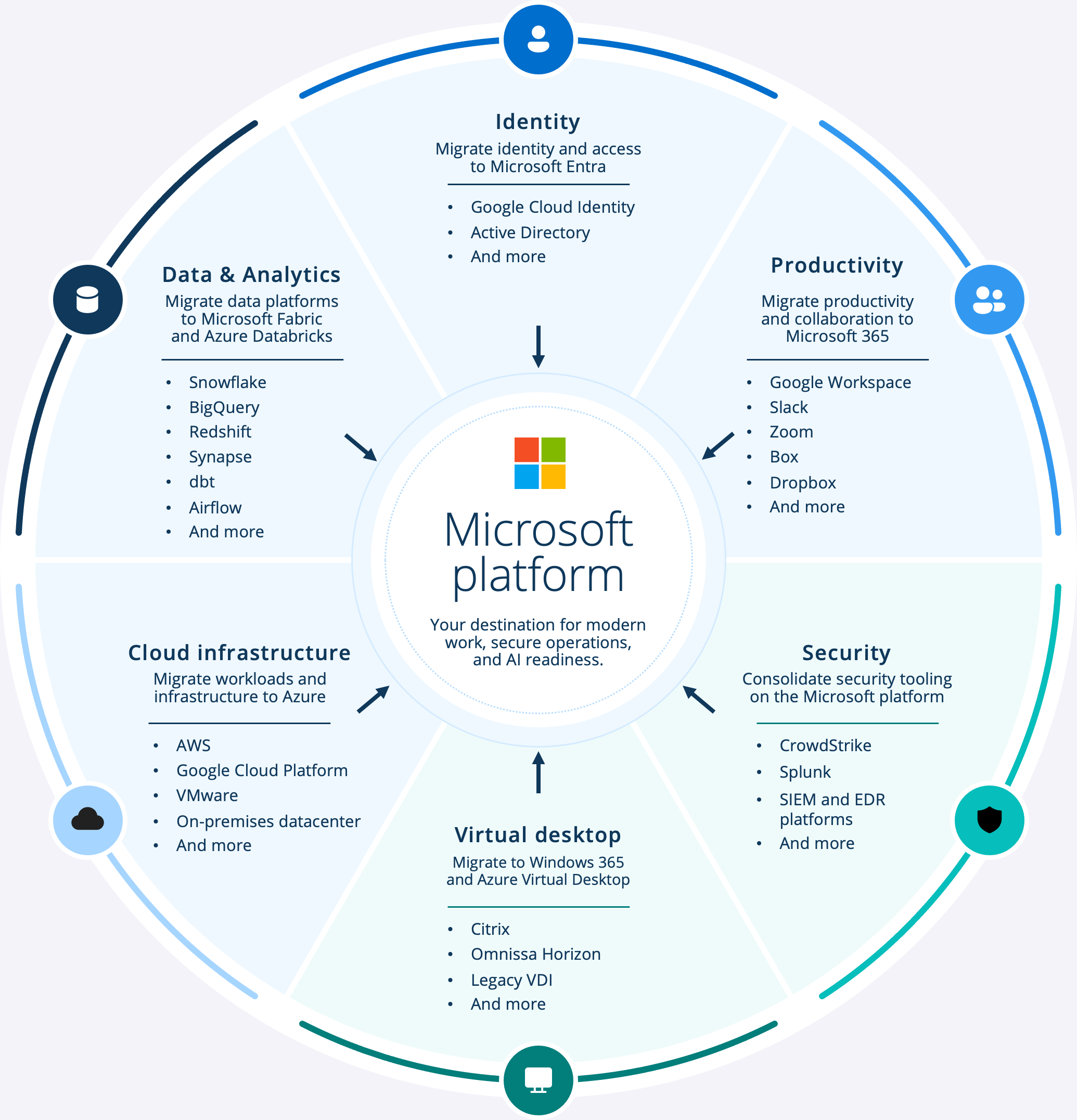
Identity from Google Cloud Identity, Okta, or Active Directory to Microsoft Entra
Productivity from Google Workspace, Slack, Zoom, Box, or Dropbox to Microsoft 365
Security from CrowdStrike, Splunk, and standalone SIEM/EDR tools onto the Microsoft security platform
Virtual desktops from Citrix, Omnissa Horizon, or legacy VDI to Windows 365 and Azure Virtual Desktop
Cloud infrastructure from AWS, Google Cloud, VMware, or an on-premises datacenter to Azure
Data & analytics from Snowflake, BigQuery, Redshift, Synapse, dbt, or Airflow to Microsoft Fabric and Azure Databricks
Why this is coming up now
Cost
- A renewal quote that forces a decision
- Entitlements you may already own
- A data-platform bill climbing every quarter
- Paying two vendors to move the same data
Risk
- A security questionnaire the current stack can't satisfy
- Two identity systems doubling attack surface and admin work
- Audit or compliance pressure
Growth
- Sprawl across tools, data, and infrastructure
- Separate admin models and security postures
- Renewal dates nobody chose
- A stack that can't answer a customer's question
AI readiness
- Copilot needs governed data to be useful
- Agents inherit whatever security posture the estate has
- You want an identity model you can extend, not rebuild
Which move are you facing?
Identity consolidation to Microsoft Entra
You’re running two identity systems because you grew into the second one, not because you chose it. Every app you add has to be wired into both, and every access review happens twice.
Productivity and collaboration to Microsoft 365
You started on the productivity suite that was fastest to stand up. Now enterprise deals are asking security and compliance questions it can’t answer.
Security tooling to the Microsoft platform
Your security stack is a set of point tools bought at different times. Consolidating detection, SIEM, and data protection onto one platform cuts cost and closes the seams attackers use.
Data platforms to Microsoft Fabric and Azure Databricks
Your analytics estate sits apart from the platform your AI strategy runs on, and you’re paying for the gap in egress, integration, and governance. We consolidate where it makes sense. If Snowflake, BigQuery, dbt, or Airflow are working for you, they integrate instead of getting replaced.
Datacenter and cloud to Azure
Your product runs on Azure. The rest of your estate — datacenter remnants, workloads inherited on AWS or GCP — doesn’t, and it’s dragging against the platform you already bet on.
Virtual desktops to Windows 365 and Azure Virtual Desktop
If your VDI renewal quote made you sit down, this one’s for you. The desktop rights you need often already come with your Microsoft licensing.
Book a 30-minute review. We'll tell you what's worth moving, what should stay, and what to resolve first.
Keeping your business running during a migration
The hard part isn’t deciding to move. It’s moving a system your business runs on without losing a day of productivity — and for a lot of digital natives, without downtime at all. That’s the whole design of how we work.
Migrations struggle in the in-between: half-moved, paying for two platforms, with teams drifting back to the tools that still work. Our process is built to keep you out of that state.
Three things every migration conversation comes back to — and the reason digital natives choose Inviso:
Avoid disruption
A desktop or productivity move touches every employee on day one. A data or infrastructure move can be invisible to most of the organization and demanding for a few teams. We scope the plan to the change, not a template.
Support your employees
Role-based training before each wave, floor support on cutover days, and a named point of contact throughout — not a handoff at go-live.
Protect productivity
Waves, coexistence, and tested rollback exist so the business keeps running while the move happens. No wave goes ahead on optimism.
We operate in the in-between
FAQs
What migrations does Inviso deliver?
Six paths onto the Microsoft platform: identity consolidation to Entra, productivity and collaboration to Microsoft 365, security tooling to the Microsoft platform, data platforms to Fabric and Azure Databricks, datacenter and cloud to Azure, and virtual desktops to Windows 365 and Azure Virtual Desktop. Most engagements combine a few of these, sequenced so identity comes first.
What if we've already started and stalled?
That’s a common starting point, not a problem. We operate in the in-between — half-moved estates, two identity systems, a tenant running alongside the old tools. We map where you are, decide what’s worth finishing, and sequence the rest. You don’t have to unwind what you’ve done to move forward.
We've bought the licenses but haven't rolled them out — can you help?
Yes. A very common entry point is a tenant you’re paying for but haven’t deployed, sitting next to tools you want to keep, like Jamf. We map how it all fits, roll out what’s ready, and integrate the rest. You don’t have to replace what’s working to get value from what you’ve bought.
What if the assessment says we should not migrate?
Then it says so, in writing. Every assessment produces a do-not-migrate list alongside the migration plan: workloads that should stay where they are, tools worth keeping, and moves that wouldn’t pay for themselves. You keep the assessment either way.
How do you handle rollback if a migration wave fails?
Every wave has go/no-go criteria agreed in advance and a tested rollback to the last stable state. A wave that doesn’t meet its criteria doesn’t proceed, and the business keeps running on what was already working. You’re reversible until the final wave.
How long does a migration take?
It depends on the path and the estate. Strategy sessions run one to two weeks; the assessment runs about three. From there, timelines are driven by the number and complexity of workloads — the assessment gives you a sequenced plan with realistic durations before you commit to the move.
Can Microsoft help cover the cost of a migration?
Often, yes. Microsoft co-invests in qualifying migrations, and which pathway applies depends on the scenario and on current programs. The assessment includes an eligibility check, so you’ll know what’s available for your specific move. Talk to your account executive, or ask us and we’ll walk you through it.
Book an assessment. Know what moves, what stays, and what risks to resolve first.
We map your estate, identify the dependencies that could cause problems, and give you a wave plan that names the risks and puts them in order. You keep the output whether or not you move forward with Inviso.